

C++11 began supporting lambda expressions. Besides being used as anonymous functions, lambda expressions can also access variables in the surrounding environment through a capture list. In UI programming, using lambda expressions instead of traditional function pointers for handling callback functions can not only simplify the code and improve readability but also reduce parameter passing and increase flexibility. Below, we attempt to implement related operations for commonly used C++ UI libraries.
1. wxWidgets Event Bind
1.1 wxWidgets Event Mechanism
wxWidgets has two sets of event mechanisms: one is a static event table1, and the other is a dynamic event mechanism2. The dynamic event mechanism provides two sets of APIs, Connect() and Bind()3, the latter being newer, while the former is deprecated.
In fact, Bind() natively supports Lambda expressions, and we can rewrite the example code from the official documentation4 as follows.
// --- main.cpp ---

#include <wx/wx.h>

enum
{
    ID_Hello = 1
};

class MyFrame : public wxFrame
{
public:
    MyFrame()
        : wxFrame(nullptr, wxID_ANY, "Hello World")
    {
        wxMenu *menuFile = new wxMenu;
        menuFile->Append(ID_Hello, "&Hello...\tCtrl-H",
                         "Help string shown in status bar for this menu item");
        menuFile->AppendSeparator();
        menuFile->Append(wxID_EXIT);

        wxMenu *menuHelp = new wxMenu;
        menuHelp->Append(wxID_ABOUT);

        wxMenuBar *menuBar = new wxMenuBar;
        menuBar->Append(menuFile, "&File");
        menuBar->Append(menuHelp, "&Help");

        SetMenuBar(menuBar);

        CreateStatusBar();
        SetStatusText("Welcome to wxWidgets!");

        Bind(wxEVT_MENU, [](wxCommandEvent &event)
             { wxLogMessage("Hello world from wxWidgets!"); }, ID_Hello);
        Bind(wxEVT_MENU, [](wxCommandEvent &event)
             { wxMessageBox("This is a wxWidgets Hello World example",
                            "About Hello World", wxOK | wxICON_INFORMATION); }, wxID_ABOUT);
        Bind(wxEVT_MENU, [this](wxCommandEvent &event)
             { this->Close(true); }, wxID_EXIT);
    }
};

class MyApp : public wxApp
{
public:
    bool OnInit() override
    {
        MyFrame *frame = new MyFrame();
        frame->Show(true);
        return true;
    }
};

wxIMPLEMENT_APP(MyApp);
Pay attention to the number of parameters passed to the Bind() function; here there is no need to pass the this pointer. After rewriting with a Lambda expression, member functions of the window class are basically not needed. When you need to call the object’s own methods to perform specific operations (such as closing the window), you can obtain the object’s this pointer through the capture list.
1.2 CMake configuration file
Here, we still use CMake to manage project builds. The CMakeLists.txt file is written as follows.
# --- CMakeLists.txt ---

cmake_minimum_required(VERSION 3.21)
set(PROJECT_NAME wx_sample)
project(${PROJECT_NAME} LANGUAGES CXX)
set(CMAKE_CXX_STANDARD 11)

if(NOT "$ENV{VCPKG_TARGET_TRIPLET}" STREQUAL "")
  set(VCPKG_TARGET_TRIPLET $ENV{VCPKG_TARGET_TRIPLET})
  message(STATUS "VCPKG_TARGET_TRIPLET: ${VCPKG_TARGET_TRIPLET}")
endif()

if(MINGW)
  message(STATUS "Set mingw cxx flags: -mwindows")
  set(CMAKE_CXX_FLAGS "${CMAKE_CXX_FLAGS} -mwindows")
endif()

# find wxWidgets
find_package(wxWidgets REQUIRED COMPONENTS core base)

if(wxWidgets_USE_FILE) # not defined in CONFIG mode
  include(${wxWidgets_USE_FILE})
endif()

add_executable(${PROJECT_NAME} main.cpp)

if(MSVC)
  set_target_properties(${PROJECT_NAME} PROPERTIES LINK_FLAGS "/SUBSYSTEM:WINDOWS")
  message(STATUS "Set msvc link flags: /SUBSYSTEM:WINDOWS")

  if(${VCPKG_TARGET_TRIPLET} MATCHES "static")
    set_property(TARGET ${PROJECT_NAME} PROPERTY
      MSVC_RUNTIME_LIBRARY "MultiThreaded$<$<CONFIG:Debug>:Debug>")
    message(STATUS "Set msvc runtime library: MultiThreaded$<$<CONFIG:Debug>:Debug>")
  endif()
endif()

target_link_libraries(${PROJECT_NAME} ${wxWidgets_LIBRARIES})

# set installation directories
install(TARGETS ${PROJECT_NAME}
  BUNDLE DESTINATION bin
  RUNTIME DESTINATION bin
)

if(${VCPKG_TARGET_TRIPLET} MATCHES "static")
  message(STATUS "Static build, no need to install runtime dependencies")
else()
  message(STATUS "Dynamic build, install runtime dependencies")
  install(CODE [[
    if("$ENV{VCPKG_TARGET_TRIPLET}" STREQUAL "")
      find_program(WXRC wxrc HINTS $ENV{PATH})
      if(NOT WXRC)
        message(FATAL_ERROR "wxrc not found in PATH")
      else()
        message(STATUS "wxrc found: ${WXRC}")
        cmake_path(GET WXRC PARENT_PATH WX_BIN_DIR)
        message(STATUS "wx bin dir: ${WX_BIN_DIR}")
      endif()
    else()
      set(WX_BIN_DIR "$ENV{VCPKG_ROOT}/installed/$ENV{VCPKG_TARGET_TRIPLET}/bin")
      if(NOT EXISTS ${WX_BIN_DIR})
        message(FATAL_ERROR "wx bin dir not found: ${WX_BIN_DIR}")
      endif()
    endif()
    file(GET_RUNTIME_DEPENDENCIES
        RESOLVED_DEPENDENCIES_VAR RESOLVED_DEPS
        UNRESOLVED_DEPENDENCIES_VAR UNRESOLVED_DEPS
        EXECUTABLES $<TARGET_FILE:wx_sample>
        DIRECTORIES ${WX_BIN_DIR}
        PRE_EXCLUDE_REGEXES "system32"
        PRE_EXCLUDE_REGEXES "api-ms-*"
        POST_EXCLUDE_REGEXES "system32"
    )
    foreach(DEP_LIB ${RESOLVED_DEPS})
        file(INSTALL ${DEP_LIB} DESTINATION ${CMAKE_INSTALL_PREFIX}/bin)
    endforeach()
    ]])
endif()
The configuration file has been improved here. If you are using the MSYS2 toolchain or the Conda package manager, you can identify the installation directory of wxWidgets by looking for the wxrc tool in the environment variables and copy the relevant dependency library files.
1.3 CMake Build and Release
Use the following commands to configure, build, and install.
cmake -B build .
cmake --build build --config Release
cmake --install build --config Release --prefix $PWD/install
If you compile and install through vcpkg on Windows, you need to set environment variables in advance, and you also need to pass the vcpkg toolchain path when configuring with CMake. If VCPKG_TARGET_TRIPLET is set to a static version, such as x64-windows-static, the step of copying dependencies will be automatically skipped during the release.
$Env:VCPKG_ROOT="D:/vcpkg"
$Env:VCPKG_TARGET_TRIPLET="x64-windows"
cmake -B build . `
 -DCMAKE_TOOLCHAIN_FILE="${env:VCPKG_ROOT}/scripts/buildsystems/vcpkg.cmake"
cmake --build build --config Release
cmake --install build --config Release --prefix $PWD/install
1.4 VSCode configuration file
When using VSCode as a development tool, you need to create a settings.json file in the .vscode directory to define the parameters, switches, and environment variables for the CMake extension.
// --- settings.json ---

{
    "cmake.environment": {
        "VCPKG_ROOT": "D:/vcpkg",
        "VCPKG_TARGET_TRIPLET": "x64-windows",
    },
    "cmake.configureArgs": [
        "-DCMAKE_TOOLCHAIN_FILE=${env:VCPKG_ROOT}/scripts/buildsystems/vcpkg.cmake",
    ],
    "cmake.configureSettings": {
        "CMAKE_EXPORT_COMPILE_COMMANDS": true
    },
    "cmake.buildDirectory": "${workspaceFolder}/build",
    "cmake.installPrefix": "${workspaceFolder}/install",
    "cmake.buildBeforeRun": false,
    "cmake.automaticReconfigure": false,
    "cmake.configureOnOpen": false,
    "cmake.configureOnEdit": false,
}
Here, the build directory is defined as build, and the installation/publishing directory is install. The automatic refresh of configuration files is disabled, so you need to manually generate/refresh the configuration files.
If conditions allow, it is recommended to use static compilation as much as possible, as this will result in a smaller installation package and make publishing more convenient.

2. FLTK Callback Function
2.1 Callback function accessing class members
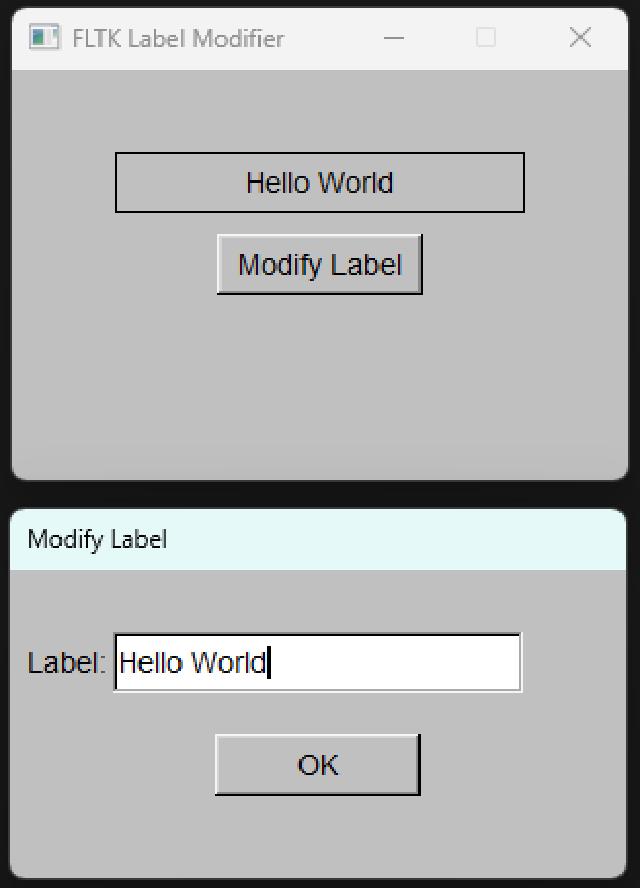
Compared to other UI libraries, FLTK’s event handling is very simple, relying only on function pointers and callback functions5. FLTK’s callback functions only support external functions and static methods. In the past, to use a callback function within a window class to access the class’s members, you had to pass the class instance’s this pointer through a static member function and type casting6, which was very cumbersome to write. Below is an example of modifying the string displayed on the main window’s label through a pop-up dialog.
// --- main.cpp ---

#include <FL/Fl.H>
#include <FL/Fl_Window.H>
#include <FL/Fl_Button.H>
#include <FL/Fl_Box.H>
#include <FL/Fl_Input.H>
#include <FL/Fl_Double_Window.H>
#include <FL/fl_ask.H>

class MyWindow : public Fl_Window
{
private:
    Fl_Button *btn;
    Fl_Box *labelBox;
    Fl_Input *dialogInput;
    static void dialogCallback(Fl_Widget *w, void *data)
    {
        MyWindow *window = (MyWindow *)data;
        if (window->dialogInput && window->dialogInput->value())
        {
            window->labelBox->copy_label(window->dialogInput->value());
        }
        if (w->window())
        {
            w->window()->hide();
            delete w->window();
        }
    }
    static void btnCallback(Fl_Widget *w, void *data)
    {
        MyWindow *window = (MyWindow *)data;
        Fl_Double_Window *dialog = new Fl_Double_Window(300, 150, "Modify Label");
        dialog->begin();
        Fl_Input *input = new Fl_Input(50, 30, 200, 30, "Label:");
        input->value(window->labelBox->label());
        window->dialogInput = input;
        Fl_Button *confirmBtn = new Fl_Button(100, 80, 100, 30, "OK");
        confirmBtn->callback(dialogCallback, window);
        dialog->end();
        dialog->set_modal();
        dialog->show();
    }
public:
    MyWindow(int w, int h, const char *title) : Fl_Window(w, h, title), dialogInput(nullptr)
    {
        begin();
        labelBox = new Fl_Box(50, 40, 200, 30, "Hello World");
        labelBox->box(FL_BORDER_BOX);
        labelBox->align(FL_ALIGN_CENTER | FL_ALIGN_INSIDE);
        btn = new Fl_Button(100, 80, 100, 30, "Modify Label");
        btn->callback(btnCallback, this);
        end();
    }
    ~MyWindow() { dialogInput = nullptr; }
};
int main()
{
    MyWindow win(300, 200, "FLTK Label Modifier");
    win.show();
    return Fl::run();
}
2.2 Lambda expression without a capture list
For the callback function of the button here, if you use a Lambda expression, it is written as follows.
...
        btn->callback([](Fl_Widget *w, void *data)
                      {
            MyWindow *window = (MyWindow *)data;
            Fl_Double_Window *dialog = new Fl_Double_Window(300, 150, "Modify Label");
            dialog->begin();
            Fl_Input *input = new Fl_Input(50, 30, 200, 30, "Label:");
            input->value(window->labelBox->label());
            window->dialogInput = input;
            Fl_Button *confirmBtn = new Fl_Button(100, 80, 100, 30, "OK");
            confirmBtn->callback([](Fl_Widget *w, void *data){
                MyWindow *window = (MyWindow *)data;
                if (window->dialogInput && window->dialogInput->value())
                {
                    window->labelBox->copy_label(window->dialogInput->value());
                }
                if (w->window())
                {
                    w->window()->hide();
                    delete w->window();
                }
            }, window);
            dialog->end();
            dialog->set_modal();
            dialog->show(); }, this);
...
This way of writing looks similar to the static member function approach in the previous section and can compile normally. However, here we are simply splitting the two static member functions and nesting them into the button’s callback function, without using a capture list. Note that the capture list must be empty in order to compile successfully.
The only limitation of calling a Lambda expression directly in callback() is that cannot use a capture list to access external variables; you can only pass the this pointer through parameters. This is because, at the compiler level, a Lambda expression with a capture list is treated as a function object (functor)7, whereas one without is treated as an anonymous function. FLTK’s callback() function implicitly converts Lambda expressions into external anonymous functions and does not support function objects. Therefore, if a Lambda expression with a capture list is used as a parameter to callback(), the compiler will generate an error.
2.3 Lambda expression with a capture list
If you really want to use a lambda expression with a capture list in callback(), there is a way: you can add another layer of conversion and try to convert the lambda into a function object and then into a function pointer8. You can refer to the following example, which defines a conversion function.
...
// Define a conversion function,
// which can be included in a separate header file.
using CALLBACK0 = void (*)(Fl_Widget *);
template <typename F>
CALLBACK0 lambda2fun(F lambda)
{
    static auto l = lambda;
    return [](Fl_Widget *w)
    {
        l(w);
    };
}
...
Inside callback(), wrap another layer of the above conversion function to convert the Lambda with a capture list into a Lambda without a capture list, in order to avoid compiler errors.
...
        // Wrap another conversion function inside the callback() function
        btn->callback(lambda2fun([=](Fl_Widget *w)
                                 {
            Fl_Double_Window *dialog = new Fl_Double_Window(300, 150, "Modify Label");
            dialog->begin();
            Fl_Input *input = new Fl_Input(50, 30, 200, 30, "Label:");
            input->value(labelBox->label());
            dialogInput = input;
            Fl_Button *confirmBtn = new Fl_Button(100, 80, 100, 30, "OK");
            confirmBtn->callback(lambda2fun([=](Fl_Widget *w){
                if (dialogInput && dialogInput->value())
                {
                    labelBox->copy_label(dialogInput->value());
                }
                if (w->window())
                {
                    w->window()->hide();
                    delete w->window();
                }
            }));
            dialog->end();
            dialog->set_modal();
            dialog->show(); }));
...
The capture list [=] here captures all variables by value by default, including the this pointer. Accessing member variables within the Lambda function body implicitly uses the this pointer, so you don’t need to explicitly specify this->, which improves readability.
2.4 Build, compile, and release
The CMake configuration file CMakeLists.txt is written as follows. Programs released by FLTK are very small, and generally only need to be compiled statically. Considering that some platforms, such as MSYS2, cannot achieve static compilation and always require the compiler’s runtime dependency libraries, it is safer to include the automatic copying of dependencies during release.
# --- CMakeLists.txt ---

cmake_minimum_required(VERSION 3.21)
set(PROJECT_NAME fltk_sample)
project(${PROJECT_NAME} LANGUAGES CXX)
set(CMAKE_CXX_STANDARD 17)

if(NOT "$ENV{VCPKG_TARGET_TRIPLET}" STREQUAL "")
  set(VCPKG_TARGET_TRIPLET $ENV{VCPKG_TARGET_TRIPLET})
  message(STATUS "VCPKG_TARGET_TRIPLET: ${VCPKG_TARGET_TRIPLET}")
endif()

# find fltk
find_package(FLTK REQUIRED)

if(FLTK_FOUND)
  message(STATUS "Found FLTK: ${FLTK_VERSION}")
  message(STATUS "FLTK_INCLUDE_DIR: ${FLTK_INCLUDE_DIR}")
  include_directories(${FLTK_INCLUDE_DIR})
  message(STATUS "FLTK_LIBRARIES: ${FLTK_LIBRARIES}")
else()
  message(FATAL_ERROR "FLTK not found")
endif()

add_executable(${PROJECT_NAME} main.cpp)

if(MSVC)
  target_link_options(${PROJECT_NAME} PRIVATE "/SUBSYSTEM:WINDOWS" "/ENTRY:mainCRTStartup")
  message(STATUS "Set msvc link flags: /SUBSYSTEM:WINDOWS /ENTRY:mainCRTStartup")

  if(${VCPKG_TARGET_TRIPLET} MATCHES "static")
    set_property(TARGET ${PROJECT_NAME} PROPERTY
      MSVC_RUNTIME_LIBRARY "MultiThreaded$<$<CONFIG:Debug>:Debug>")
    message(STATUS "Set msvc runtime library: MultiThreaded$<$<CONFIG:Debug>:Debug>")
  endif()
elseif(MINGW)
  target_link_options(${PROJECT_NAME} PRIVATE "-mwindows")
  message(STATUS "Set mingw link flags: -mwindows")
endif()

target_link_libraries(${PROJECT_NAME} ${FLTK_LIBRARIES})

# set installation directories
install(TARGETS ${PROJECT_NAME}
  BUNDLE DESTINATION bin
  RUNTIME DESTINATION bin
)

if(${VCPKG_TARGET_TRIPLET} MATCHES "static")
  message(STATUS "Static build, no need to install runtime dependencies")
else()
  message(STATUS "Dynamic build, install runtime dependencies")
  install(CODE [[
    if("$ENV{VCPKG_TARGET_TRIPLET}" STREQUAL "")
      find_program(FLUID fluid HINTS $ENV{PATH})
      if(NOT FLUID)
        message(FATAL_ERROR "fluid not found in PATH")
      else()
        message(STATUS "fluid found: ${FLUID}")
        cmake_path(GET FLUID PARENT_PATH FLTK_BIN_DIR)
        message(STATUS "fltk bin dir: ${FLTK_BIN_DIR}")
      endif()
    else()
      set(FLTK_BIN_DIR "$ENV{VCPKG_ROOT}/installed/$ENV{VCPKG_TARGET_TRIPLET}/bin")
      if(NOT EXISTS ${FLTK_BIN_DIR})
        message(FATAL_ERROR "fltk bin dir not found: ${FLTK_BIN_DIR}")
      endif()
    endif()
    file(GET_RUNTIME_DEPENDENCIES
        RESOLVED_DEPENDENCIES_VAR RESOLVED_DEPS
        UNRESOLVED_DEPENDENCIES_VAR UNRESOLVED_DEPS
        # path to the executable files
        EXECUTABLES $<TARGET_FILE:fltk_sample>
        # directories to search for library files
        DIRECTORIES ${FLTK_BIN_DIR}
        PRE_EXCLUDE_REGEXES "system32"
        PRE_EXCLUDE_REGEXES "api-ms-*"
        POST_EXCLUDE_REGEXES "system32"
    )
    foreach(DEP_LIB ${RESOLVED_DEPS})
        file(INSTALL ${DEP_LIB} DESTINATION ${CMAKE_INSTALL_PREFIX}/bin)
    endforeach()
    ]])
endif()
The compilation and release commands for cmake in the terminal are the same as in 1.3 . If you are using VSCode, the configuration files are the same as in 1.4 , so they will not be repeated here.
The program runs as follows.
3. Qt Signals and Slots
3.1 Signal and slot mechanism
Unlike event handling and callback functions, Qt implements communication between objects through the signal-slot mechanism9. However, the signal-slot mechanism is beyond the C standard and relies more on Qt’s own implementation, requiring metaprogramming of Qt source code using Qt’s own tools. Fortunately, Qt slot functions themselves support Lambda expressions, so there is no need to wrap or convert them like FLTK callback functions.
The following implements the same functionality as 2.1 , modifying the main window’s member variables through a dialog that pops up when a button is clicked.
// --- main.cpp ---

#include <QApplication>
#include <QMainWindow>
#include <QVBoxLayout>
#include <QHBoxLayout>
#include <QLabel>
#include <QPushButton>
#include <QDialog>
#include <QLineEdit>
#include <QDialogButtonBox>
#include <QMessageBox>

class InputDialog : public QDialog
{
    Q_OBJECT

public:
    InputDialog(const QString &initialText, QWidget *parent = nullptr)
        : QDialog(parent)
    {
        setWindowTitle("Input");
        setModal(true);
        setFixedSize(300, 120);
        QVBoxLayout *layout = new QVBoxLayout(this);
        QLabel *label = new QLabel("Input string:", this);
        lineEdit = new QLineEdit(initialText, this);
        QDialogButtonBox *buttonBox = new QDialogButtonBox(
            QDialogButtonBox::Ok | QDialogButtonBox::Cancel, this);
        layout->addWidget(label);
        layout->addWidget(lineEdit);
        layout->addWidget(buttonBox);
        connect(buttonBox, &QDialogButtonBox::accepted, this, &InputDialog::accept);
        connect(buttonBox, &QDialogButtonBox::rejected, this, &InputDialog::reject);
    }
    QString getText() const { return lineEdit->text(); }

private:
    QLineEdit *lineEdit;
};
class MainWindow : public QMainWindow
{
    Q_OBJECT
public:
    MainWindow(QWidget *parent = nullptr) : QMainWindow(parent)
    {
        setWindowTitle("Qt6 String Editor");
        setFixedSize(400, 200);
        QWidget *centralWidget = new QWidget(this);
        setCentralWidget(centralWidget);
        QVBoxLayout *mainLayout = new QVBoxLayout(centralWidget);
        label = new QLabel("Hello World", this);
        label->setAlignment(Qt::AlignCenter);
        label->setStyleSheet("font-size: 18px; font-weight: bold; padding: 20px;");
        QPushButton *button = new QPushButton("Edit String", this);
        button->setFixedSize(120, 40);
        mainLayout->addWidget(label);
        mainLayout->addWidget(button, 0, Qt::AlignCenter);
        connect(button, &QPushButton::clicked, this, [this]()
                {   InputDialog dialog(label->text(), this);
                    if (dialog.exec() == QDialog::Accepted)
                    {
                        QString newText = dialog.getText();
                        if (!newText.isEmpty())
                            label->setText(newText);
                        else
                            QMessageBox::warning(this, "Warning", "Input string cannot be empty!");
        } });
    }

private:
    QLabel *label;
};
int main(int argc, char *argv[])
{
    QApplication app(argc, argv);
    MainWindow window;
    window.show();
    return app.exec();
}
#include "main.moc"
The main window button event is connected to a lambda expression with a capture, and it compiles correctly.
3.2 Build Configuration
The CMake configuration file CMakeLists.txt is written as follows.
# --- CMakeLists.txt ---

cmake_minimum_required(VERSION 3.21)
set(PROJECT_NAME qt_sample)
project(${PROJECT_NAME} VERSION 0.0.1 LANGUAGES CXX)
set(CMAKE_AUTOUIC ON)
set(CMAKE_AUTOMOC ON)
set(CMAKE_AUTORCC ON)

set(CMAKE_CXX_STANDARD 17)
set(CMAKE_CXX_STANDARD_REQUIRED ON)

if(NOT "$ENV{VCPKG_TARGET_TRIPLET}" STREQUAL "")
  set(VCPKG_TARGET_TRIPLET $ENV{VCPKG_TARGET_TRIPLET})
  message(STATUS "VCPKG_TARGET_TRIPLET: ${VCPKG_TARGET_TRIPLET}")
endif()

# find qt6
find_package(QT NAMES Qt6 REQUIRED COMPONENTS Widgets)
find_package(Qt${QT_VERSION_MAJOR} REQUIRED COMPONENTS Widgets)

if(Qt6_FOUND)
  message(STATUS "Qt6 found: ${Qt6_DIR}")
else()
  message(FATAL_ERROR "Qt6 not found!")
endif()

set(PROJECT_SOURCES
  main.cpp
)

if(${QT_VERSION_MAJOR} GREATER_EQUAL 6)
  qt_add_executable(${PROJECT_NAME}
    MANUAL_FINALIZATION
    ${PROJECT_SOURCES}
  )
else()
  if(ANDROID)
    add_library(${PROJECT_NAME} SHARED
      ${PROJECT_SOURCES}
    )
  else()
    add_executable(${PROJECT_NAME}
      ${PROJECT_SOURCES}
    )
  endif()
endif()

target_link_libraries(${PROJECT_NAME} PRIVATE Qt${QT_VERSION_MAJOR}::Widgets)

if(MSVC AND(${VCPKG_TARGET_TRIPLET} MATCHES "static"))
  set_property(TARGET ${PROJECT_NAME} PROPERTY
    MSVC_RUNTIME_LIBRARY "MultiThreaded$<$<CONFIG:Debug>:Debug>")
  message(STATUS "Set msvc runtime library: MultiThreaded$<$<CONFIG:Debug>:Debug>")
endif()

if(${QT_VERSION} VERSION_LESS 6.1.0)
  set(BUNDLE_ID_OPTION MACOSX_BUNDLE_GUI_IDENTIFIER com.example.test)
endif()

set_target_properties(${PROJECT_NAME} PROPERTIES
  ${BUNDLE_ID_OPTION}
  MACOSX_BUNDLE_BUNDLE_VERSION ${PROJECT_VERSION}
  MACOSX_BUNDLE_SHORT_VERSION_STRING ${PROJECT_VERSION_MAJOR}.${PROJECT_VERSION_MINOR}
  MACOSX_BUNDLE TRUE
  WIN32_EXECUTABLE TRUE
)

include(GNUInstallDirs)
install(TARGETS ${PROJECT_NAME}
  BUNDLE DESTINATION .
  LIBRARY DESTINATION ${CMAKE_INSTALL_LIBDIR}
  RUNTIME DESTINATION ${CMAKE_INSTALL_BINDIR}
)

if(${VCPKG_TARGET_TRIPLET} MATCHES "static")
  message(STATUS "Static build, no need to install runtime dependencies")
else()
  message(STATUS "Dynamic build, install runtime dependencies")
  set(deploy_tool_options_arg "")

  if(APPLE)
    set(deploy_tool_options_arg --hardened-runtime)
  elseif(WIN32)
    set(deploy_tool_options_arg --no-compiler-runtime)
  endif()

  qt_generate_deploy_app_script(
    TARGET ${PROJECT_NAME}
    OUTPUT_SCRIPT deploy_script
    NO_UNSUPPORTED_PLATFORM_ERROR
    DEPLOY_TOOL_OPTIONS ${deploy_tool_options_arg}
  )
  install(SCRIPT ${deploy_script})
  install(CODE [[
    if("$ENV{VCPKG_TARGET_TRIPLET}" STREQUAL "")
      find_program(QMAKE qmake6 HINTS $ENV{PATH})
      if(NOT QMAKE)
        message(FATAL_ERROR "qmake not found in PATH")
      else()
        message(STATUS "fluid found: ${QMAKE}")
        cmake_path(GET QMAKE PARENT_PATH QT_BIN_DIR)
        message(STATUS "qmake bin dir: ${QT_BIN_DIR}")
      endif()
    else()
      set(QT_BIN_DIR "$ENV{VCPKG_ROOT}/installed/$ENV{VCPKG_TARGET_TRIPLET}/bin")
      if(NOT EXISTS ${QT_BIN_DIR})
        message(FATAL_ERROR "qmake bin dir not found: ${QT_BIN_DIR}")
      endif()
    endif()
    file(GET_RUNTIME_DEPENDENCIES
        RESOLVED_DEPENDENCIES_VAR RESOLVED_DEPS
        UNRESOLVED_DEPENDENCIES_VAR UNRESOLVED_DEPS
        # path to the executable files
        EXECUTABLES $<TARGET_FILE:qt_sample>
        # directories to search for library files
        DIRECTORIES ${QT_BIN_DIR}
        PRE_EXCLUDE_REGEXES "system32"
        PRE_EXCLUDE_REGEXES "api-ms-*"
        POST_EXCLUDE_REGEXES "system32"
    )
    foreach(DEP_LIB ${RESOLVED_DEPS})
        file(INSTALL ${DEP_LIB} DESTINATION ${CMAKE_INSTALL_PREFIX}/bin)
    endforeach()
    ]])
endif()
3.3 Compile and Release
The CMake build and release commands are the same as in 1.3 . The VSCode configuration files are the same as in 1.4 . The program’s interface is as follows.

4. GTK signal mechanism
4.1 GTK signals and callback functions
GTK handles events through event10 and signal11 mechanisms, binding signals to function pointers to implement event handling. Since GTK primarily uses pure C as the development language, and the standard C does not support object-oriented features, it needs to be extended to C++11 or later to support lambda expressions.
Using pure C function pointers for signal connections to achieve the same functionality as the 2.1 program, similarly popping up a dialog through a button to modify the member variables of the main window. The code is shown below.
// --- c17/pure_c.c ---

#include <gtk/gtk.h>

static GtkWidget *main_label = NULL;

static void on_dialog_confirm(GtkWidget *widget, gpointer user_data)
{
    GtkWidget *dialog = GTK_WIDGET(user_data);
    GtkWidget *entry = GTK_WIDGET(g_object_get_data(G_OBJECT(dialog), "entry"));
    const gchar *new_text = gtk_editable_get_text(GTK_EDITABLE(entry));
    gtk_label_set_text(GTK_LABEL(main_label), new_text);
    gtk_window_destroy(GTK_WINDOW(dialog));
}

static void on_dialog_cancel(GtkWidget *widget, gpointer user_data)
{
    GtkWidget *dialog = GTK_WIDGET(user_data);
    gtk_window_destroy(GTK_WINDOW(dialog));
}

static void on_main_button_clicked(GtkWidget *widget, gpointer user_data)
{
    GtkWidget *main_window = GTK_WIDGET(user_data);
    GtkWidget *dialog = gtk_window_new();
    gtk_window_set_title(GTK_WINDOW(dialog), "Edit text");
    gtk_window_set_transient_for(GTK_WINDOW(dialog), GTK_WINDOW(main_window));
    gtk_window_set_modal(GTK_WINDOW(dialog), TRUE);
    gtk_window_set_default_size(GTK_WINDOW(dialog), 300, 150);
    GtkWidget *dialog_box = gtk_box_new(GTK_ORIENTATION_VERTICAL, 10);
    gtk_window_set_child(GTK_WINDOW(dialog), dialog_box);
    gtk_widget_set_margin_top(dialog_box, 10);
    gtk_widget_set_margin_bottom(dialog_box, 10);
    gtk_widget_set_margin_start(dialog_box, 10);
    gtk_widget_set_margin_end(dialog_box, 10);
    GtkWidget *entry = gtk_entry_new();
    GtkEntryBuffer *buffer = gtk_entry_get_buffer(GTK_ENTRY(entry));
    const gchar *old_text = gtk_label_get_text(GTK_LABEL(main_label));
    gtk_entry_buffer_set_text(buffer, old_text ? old_text : "Hello World", -1);
    gtk_box_append(GTK_BOX(dialog_box), entry);
    GtkWidget *button_box = gtk_box_new(GTK_ORIENTATION_HORIZONTAL, 10);
    gtk_box_append(GTK_BOX(dialog_box), button_box);
    GtkWidget *confirm_button = gtk_button_new_with_label("Confirm");
    GtkWidget *cancel_button = gtk_button_new_with_label("Cancel");
    gtk_box_append(GTK_BOX(button_box), confirm_button);
    gtk_box_append(GTK_BOX(button_box), cancel_button);
    g_object_set_data(G_OBJECT(dialog), "entry", entry);
    g_signal_connect(confirm_button, "clicked", G_CALLBACK(on_dialog_confirm), dialog);
    g_signal_connect(cancel_button, "clicked", G_CALLBACK(on_dialog_cancel), dialog);
    gtk_window_present(GTK_WINDOW(dialog));
}

static void on_activate(GtkApplication *app, gpointer user_data)
{
    GtkWidget *main_window = gtk_application_window_new(app);
    gtk_window_set_title(GTK_WINDOW(main_window), "GTK4 Sample");
    gtk_window_set_default_size(GTK_WINDOW(main_window), 400, 200);
    GtkWidget *main_box = gtk_box_new(GTK_ORIENTATION_VERTICAL, 10);
    gtk_window_set_child(GTK_WINDOW(main_window), main_box);
    gtk_widget_set_margin_top(main_box, 20);
    gtk_widget_set_margin_bottom(main_box, 20);
    gtk_widget_set_margin_start(main_box, 20);
    gtk_widget_set_margin_end(main_box, 20);
    main_label = gtk_label_new("Hello World");
    GtkWidget *button = gtk_button_new_with_label("Edit text");
    gtk_box_append(GTK_BOX(main_box), main_label);
    gtk_box_append(GTK_BOX(main_box), button);
    g_signal_connect(button, "clicked", G_CALLBACK(on_main_button_clicked), main_window);
    gtk_window_present(GTK_WINDOW(main_window));
}

int main(int argc, char *argv[])
{
    GtkApplication *app = gtk_application_new("com.example.gtk_sample", G_APPLICATION_DEFAULT_FLAGS);
    g_signal_connect(app, "activate", G_CALLBACK(on_activate), NULL);
    int status = g_application_run(G_APPLICATION(app), argc, argv);
    g_object_unref(app);
    return status;
}
4.2 Implementation with Lambda Expressions
Refer to 2.3 , where function pointers are replaced with lambdas with captures. Note that C++ syntax is used here, so support for C++ should be enabled in the compiler options or build system.
// --- cpp17/cpp_lambda.cpp ---

#include <gtk/gtk.h>

// Conversion function,
using CALLBACK1 = void (*)(GtkWidget *, gpointer);
template <typename F>
CALLBACK1 lambda2fun(F lambda)
{
    static auto l = lambda;
    return [](GtkWidget *w, gpointer user_data)
    {
        l(w, user_data);
    };
}

static void on_activate(GtkApplication *app, gpointer user_data)
{
    // main window
    GtkWidget *main_window = gtk_application_window_new(app);
    gtk_window_set_title(GTK_WINDOW(main_window), "GTK4 Sample");
    gtk_window_set_default_size(GTK_WINDOW(main_window), 400, 200);
    GtkWidget *main_box = gtk_box_new(GTK_ORIENTATION_VERTICAL, 10);
    gtk_window_set_child(GTK_WINDOW(main_window), main_box);
    gtk_widget_set_margin_top(main_box, 20);
    gtk_widget_set_margin_bottom(main_box, 20);
    gtk_widget_set_margin_start(main_box, 20);
    gtk_widget_set_margin_end(main_box, 20);
    GtkWidget *main_label = gtk_label_new("Hello World");
    GtkWidget *button = gtk_button_new_with_label("Edit text");
    gtk_box_append(GTK_BOX(main_box), main_label);
    gtk_box_append(GTK_BOX(main_box), button);
    // entry dialog
    GtkWidget *dialog = gtk_window_new();
    gtk_window_set_title(GTK_WINDOW(dialog), "Edit text");
    gtk_window_set_transient_for(GTK_WINDOW(dialog), GTK_WINDOW(main_window));
    gtk_window_set_modal(GTK_WINDOW(dialog), TRUE);
    gtk_window_set_hide_on_close(GTK_WINDOW(dialog), TRUE);
    gtk_window_set_default_size(GTK_WINDOW(dialog), 300, 150);
    GtkWidget *dialog_box = gtk_box_new(GTK_ORIENTATION_VERTICAL, 10);
    gtk_window_set_child(GTK_WINDOW(dialog), dialog_box);
    gtk_widget_set_margin_top(dialog_box, 10);
    gtk_widget_set_margin_bottom(dialog_box, 10);
    gtk_widget_set_margin_start(dialog_box, 10);
    gtk_widget_set_margin_end(dialog_box, 10);
    GtkWidget *entry = gtk_entry_new();
    GtkEntryBuffer *buffer = gtk_entry_get_buffer(GTK_ENTRY(entry));
    gtk_box_append(GTK_BOX(dialog_box), entry);
    GtkWidget *button_box = gtk_box_new(GTK_ORIENTATION_HORIZONTAL, 10);
    gtk_box_append(GTK_BOX(dialog_box), button_box);
    GtkWidget *confirm_button = gtk_button_new_with_label("Confirm");
    GtkWidget *cancel_button = gtk_button_new_with_label("Cancel");
    gtk_box_append(GTK_BOX(button_box), confirm_button);
    gtk_box_append(GTK_BOX(button_box), cancel_button);
    // connect signals
    g_signal_connect(confirm_button, "clicked", G_CALLBACK(lambda2fun([dialog, main_label, buffer](GtkWidget *widget, gpointer user_data)
                                                                      {
        const gchar *new_text = gtk_entry_buffer_get_text(buffer);
        gtk_label_set_text(GTK_LABEL(main_label), new_text);
        gtk_window_close(GTK_WINDOW(dialog)); })),
                     NULL);
    g_signal_connect(cancel_button, "clicked", G_CALLBACK(lambda2fun([dialog](GtkWidget *widget, gpointer user_data)
                                                                     { gtk_window_close(GTK_WINDOW(dialog)); })),
                     NULL);

    g_signal_connect(button, "clicked", G_CALLBACK(lambda2fun([dialog, buffer, main_label](GtkWidget *widget, gpointer user_data)
                                                              {
        const gchar *old_text = gtk_label_get_text(GTK_LABEL(main_label));
        gtk_entry_buffer_set_text(buffer, old_text ? old_text : "Hello World", -1);
        gtk_window_present(GTK_WINDOW(dialog)); })),
                     NULL);
    gtk_window_present(GTK_WINDOW(main_window));
}

int main(int argc, char *argv[])
{
    GtkApplication *app = gtk_application_new("com.example.gtk_sample", G_APPLICATION_DEFAULT_FLAGS);
    g_signal_connect(app, "activate", G_CALLBACK(on_activate), NULL);
    int status = g_application_run(G_APPLICATION(app), argc, argv);
    g_object_unref(app);
    return status;
}
Through the capture list of a Lambda expression, external environment variables can be easily accessed, avoiding the readability and security issues caused by defining global variables.
4.3 Captured variable lifetime issues
When using capture lists, it’s especially important to pay attention to the lifecycle of the captured variables. Careful readers may have already noticed that if you directly translate pure C code, the Lambda expression in the example above can be written in the following form.
...
    g_signal_connect(button, "clicked", G_CALLBACK(lambda2fun([main_window, main_label](GtkWidget *widget, gpointer user_data)
                                                              {
        GtkWidget *dialog = gtk_window_new();
        gtk_window_set_title(GTK_WINDOW(dialog), "Edit text");
        gtk_window_set_transient_for(GTK_WINDOW(dialog), GTK_WINDOW(main_window));
        gtk_window_set_modal(GTK_WINDOW(dialog), TRUE);
        gtk_window_set_default_size(GTK_WINDOW(dialog), 300, 150);
        GtkWidget *dialog_box = gtk_box_new(GTK_ORIENTATION_VERTICAL, 10);
        gtk_window_set_child(GTK_WINDOW(dialog), dialog_box);
        gtk_widget_set_margin_top(dialog_box, 10);
        gtk_widget_set_margin_bottom(dialog_box, 10);
        gtk_widget_set_margin_start(dialog_box, 10);
        gtk_widget_set_margin_end(dialog_box, 10);
        GtkWidget *entry = gtk_entry_new();
        GtkEntryBuffer *buffer = gtk_entry_get_buffer(GTK_ENTRY(entry));
        const gchar *old_text = gtk_label_get_text(GTK_LABEL(main_label));
        gtk_entry_buffer_set_text(buffer, old_text ? old_text : "Hello World", -1);
        gtk_box_append(GTK_BOX(dialog_box), entry);
        GtkWidget *button_box = gtk_box_new(GTK_ORIENTATION_HORIZONTAL, 10);
        gtk_box_append(GTK_BOX(dialog_box), button_box);
        GtkWidget *confirm_button = gtk_button_new_with_label("Confirm");
        GtkWidget *cancel_button = gtk_button_new_with_label("Cancel");
        gtk_box_append(GTK_BOX(button_box), confirm_button);
        gtk_box_append(GTK_BOX(button_box), cancel_button);
        g_signal_connect(confirm_button, "clicked", G_CALLBACK(lambda2fun([main_label, dialog, buffer](GtkWidget *widget, gpointer user_data){
            const gchar *new_text = gtk_entry_buffer_get_text(buffer);
            gtk_label_set_text(GTK_LABEL(main_label), new_text);
            gtk_window_destroy(GTK_WINDOW(dialog));
        })), NULL);
        g_signal_connect(cancel_button, "clicked", G_CALLBACK(lambda2fun([dialog](GtkWidget *widget, gpointer user_data){
            gtk_window_destroy(GTK_WINDOW(dialog));
        })), NULL);
        gtk_window_present(GTK_WINDOW(dialog)); })),
                     NULL);
    gtk_window_present(GTK_WINDOW(main_window));
...
Although the above code can compile successfully, repeatedly clicking the dialog button may likely cause errors.
This approach directly embeds the dialog’s initialization and signal connection operations into the Lambda expression called by the main window button. However, the dialog windows and resources captured in the two Lambda expressions used by the dialog are local variables. The lifecycle of these local dialog variables ends when the dialog resources are released, but the capture list of the Lambda expression does not update, which causes errors on subsequent calls.
A better solution, as shown in the previous section, is to ensure that the captured variables are not released during the execution cycle of the Lambda expression. Avoid initializing and destroying captured resources within the Lambda expression, and also avoid nesting Lambda expressions that capture variables within each other.
4.4 Build Configuration
The CMake configuration file CMakeLists.txt is written as follows. Although GTK is written in C, features of C++ are used here, so C++ support should be enabled.
# --- cpp17/CMakeLists.txt ---

cmake_minimum_required(VERSION 3.21)
set(PROJECT_NAME gtk_sample_lambda)
project(${PROJECT_NAME} LANGUAGES CXX)
set(CMAKE_CXX_STANDARD 17)

if(NOT "$ENV{VCPKG_TARGET_TRIPLET}" STREQUAL "")
  set(VCPKG_TARGET_TRIPLET $ENV{VCPKG_TARGET_TRIPLET})
  message(STATUS "VCPKG_TARGET_TRIPLET: ${VCPKG_TARGET_TRIPLET}")
endif()

set(SRC_LIST cpp_lambda.cpp)

if(MINGW)
  set(CMAKE_C_FLAGS "-mwindows")
  set(CMAKE_CXX_FLAGS "-mwindows")
endif()

find_package(PkgConfig REQUIRED)
pkg_check_modules(GTK REQUIRED gtk4)
include_directories(${GTK_INCLUDE_DIRS})
link_directories(${GTK_LIBRARY_DIRS})
add_executable(${PROJECT_NAME} ${SRC_LIST})

if(MSVC)
  set_target_properties(${PROJECT_NAME} PROPERTIES LINK_FLAGS "/SUBSYSTEM:WINDOWS /entry:mainCRTStartup")
endif()

target_link_libraries(${PROJECT_NAME} ${GTK_LIBRARIES})

include(GNUInstallDirs)
install(TARGETS ${PROJECT_NAME}
  BUNDLE DESTINATION bin
  LIBRARY DESTINATION ${CMAKE_INSTALL_LIBDIR}
  RUNTIME DESTINATION ${CMAKE_INSTALL_BINDIR}
)

if(${VCPKG_TARGET_TRIPLET} MATCHES "static")
  message(STATUS "Static build, no need to install runtime dependencies")
else()
  message(STATUS "Dynamic build, install runtime dependencies")
  install(CODE [[
    if("$ENV{VCPKG_TARGET_TRIPLET}" STREQUAL "")
      find_program(GTK4DEMO gtk4-demo HINTS $ENV{PATH})
      if(NOT GTK4DEMO)
        message(FATAL_ERROR "gtk4-demo not found in PATH")
      else()
        message(STATUS "gtk4-demo found: ${GTK4DEMO}")
        cmake_path(GET GTK4DEMO PARENT_PATH GTK4_BIN_DIR)
        message(STATUS "gtk4-demo bin dir: ${GTK4_BIN_DIR}")
      endif()
    else()
      set(GTK4_BIN_DIR "$ENV{VCPKG_ROOT}/installed/$ENV{VCPKG_TARGET_TRIPLET}/bin")
      if(NOT EXISTS ${GTK4_BIN_DIR})
        message(FATAL_ERROR "gtk4-demo bin dir not found: ${GTK4_BIN_DIR}")
      endif()
    endif()
    file(GET_RUNTIME_DEPENDENCIES
        RESOLVED_DEPENDENCIES_VAR RESOLVED_DEPS
        UNRESOLVED_DEPENDENCIES_VAR UNRESOLVED_DEPS
        # path to the executable files
        EXECUTABLES $<TARGET_FILE:gtk_sample_lambda>
        # directories to search for library files
        DIRECTORIES ${GTK4_BIN_DIR}
        PRE_EXCLUDE_REGEXES "system32"
        PRE_EXCLUDE_REGEXES "api-ms-*"
        POST_EXCLUDE_REGEXES "system32"
    )
    foreach(DEP_LIB ${RESOLVED_DEPS})
        file(INSTALL ${DEP_LIB} DESTINATION ${CMAKE_INSTALL_PREFIX}/bin)
    endforeach()
    cmake_path(GET GTK4_BIN_DIR PARENT_PATH GTK_SEARCH_DIRS)
    set(GTK_SUB_DIRS "lib" "etc" "share")
    set(SUB_DIR_PEN "gtk-4" "glib-2" "gdk" "themes" "icons")
    foreach(SUB_DIR ${GTK_SUB_DIRS})
        foreach(PEN_DIR ${SUB_DIR_PEN})
            file(GLOB DIRECTORIES LIST_DIRECTORIES true RELATIVE "${GTK_SEARCH_DIRS}/${SUB_DIR}" "${GTK_SEARCH_DIRS}/${SUB_DIR}/*${PEN_DIR}*")
            foreach(DIR ${DIRECTORIES})
                if(IS_DIRECTORY "${GTK_SEARCH_DIRS}/${SUB_DIR}/${DIR}")
                    file(INSTALL "${GTK_SEARCH_DIRS}/${SUB_DIR}/${DIR}" DESTINATION "${CMAKE_INSTALL_PREFIX}/${SUB_DIR}")
                endif()
            endforeach()
        endforeach()
    endforeach()
    ]])
endif()
4.5 Compile and Release
The CMake build and release commands, as well as the VSCode configuration files, are the same as in 1.3 and 1.4 , and the program runs as follows.

5. Summary
For native UI libraries like wxWidgets and Qt that support Lambda expressions, it is recommended to use Lambda expressions as much as possible. In actual development, many UI event handlers are usually just a few lines of code, so there’s no need to create a separate function or file for just a few lines. Using Lambda expressions in such cases can simplify the code effectively.
For libraries like FLTK and GTK, although they do not directly support Lambda expressions, there are still ways to apply them in projects. Lambda expressions can easily handle parameter passing through capture lists, avoiding the limitations of passing parameters through callbacks, and also effectively preventing the need for global variable definitions. However, attention should be paid to the lifecycle of the captured parameters.